
BeamScope is a desktop tool for designing antenna arrays. Set the element count, spacing, window, and steering angle, and the radiation pattern updates right away in 2D and 3D, without writing a script for each experiment.
Background
Why it exists
In my work I often need to evaluate different antenna array configurations, varying element counts, spacings, window functions, and beam steering angles, and compare how each choice affects the radiation pattern. For a while I did this with one-off Python scripts, running them and piecing together plots. It worked, but it was slow and tedious every time I wanted to change a parameter.
I wanted something interactive: change a slider and see the pattern update right away. So I built this tool for myself. Over time it grew from a simple linear-array calculator into a fuller application that handles uniform rectangular arrays, arbitrary custom arrays, per-element patterns, and several plot modes. The goal has stayed the same: make it as easy as possible to explore array designs without rewriting code for every experiment.
Design an Array
Layout · weights · pattern
Lay out the elements
- Uniform rectangular: set the horizontal (y) and vertical (z) axes separately, each with up to 1024 elements, its own spacing in λ, and its own window.
- Custom array: place each element anywhere (y, z in λ) with its own amplitude and phase. Type them in or import a CSV file.
Shape the beam
- Windows taper each axis to trade main-lobe width for sidelobe level.
- Steering points the main beam anywhere from −90° to +90° in azimuth and elevation.
- Element pattern: optionally weight the array by a single element's gain, given as angle and dB tables for azimuth and elevation, typed in or imported from CSV.
Read the pattern
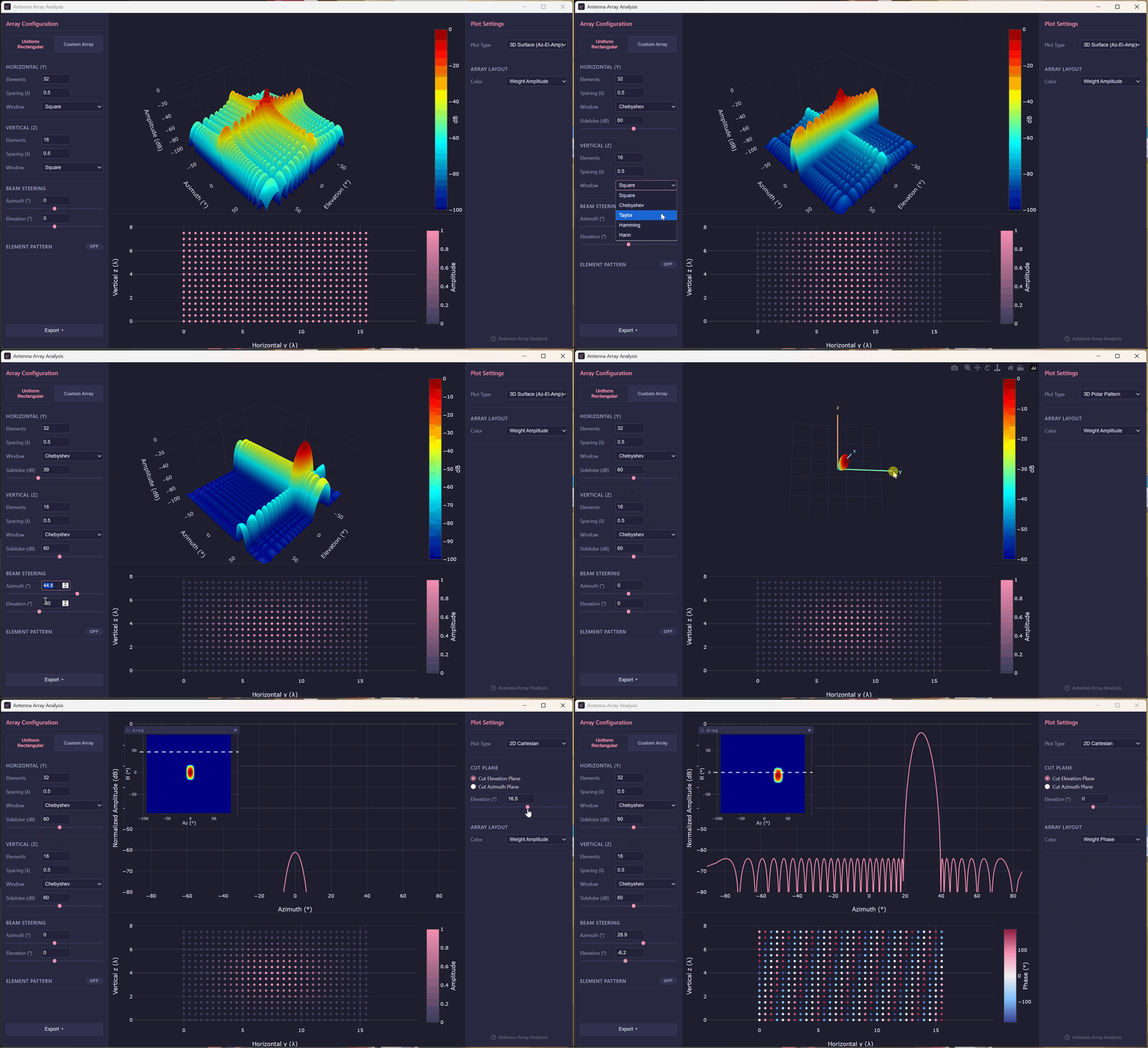
Switch between four pattern views, check the array layout colored by weight, and export the configuration and the computed pattern to CSV for use elsewhere.
Your settings are saved, so the app reopens with the array you left.
| Window | What it does | Controls |
|---|---|---|
| Square | Uniform weights. The narrowest main lobe, with the first sidelobe at about −13 dB. | none |
| Chebyshev | All sidelobes at the same level you choose, with the narrowest main lobe possible for that level. | SLL dB |
| Taylor | The nearest sidelobes held near a chosen level, with the rest falling off further out. The usual choice for radar arrays. | SLL dB n̄ |
| Hamming | A fixed taper with sidelobes around −43 dB. | none |
| Hann | A fixed taper with sidelobes around −31 dB that fall off quickly with angle. | none |
Pattern Views
Plotly, interactive
How It Works
Electron front end · Python engine
The Electron main process starts the Python bridge once and keeps it running, so each change costs one JSON round trip rather than a new Python process. The pattern math lives in arraybeam, my array-pattern library, included as a git submodule. In the installers, PyInstaller bundles the bridge into a standalone executable, so no Python install is needed.
Get Started
Installers for every desktop
Run the Squirrel installer (.exe).
Open the .dmg and drag BeamScope into Applications.
Make the .AppImage executable and run it.
All three are on the releases page, with the Python engine bundled inside.
Run from source
Needs Node.js 26+ and Python 3.9+. Clone with the arraybeam submodule:
git clone --recurse-submodules https://github.com/rookiepeng/beamscope.git
cd beamscope
npm install
pip install -r requirements.txt
npm start
If you cloned without submodules, run git submodule update --init.
Build an installer
Freeze the Python bridge, then package the app. The output in dist/ is a Squirrel installer, DMG, or AppImage depending on the platform you build on.
python scripts/build_bridge.py
npm run dist